For creators & home cooks
Sell your cookbook inside BitEat
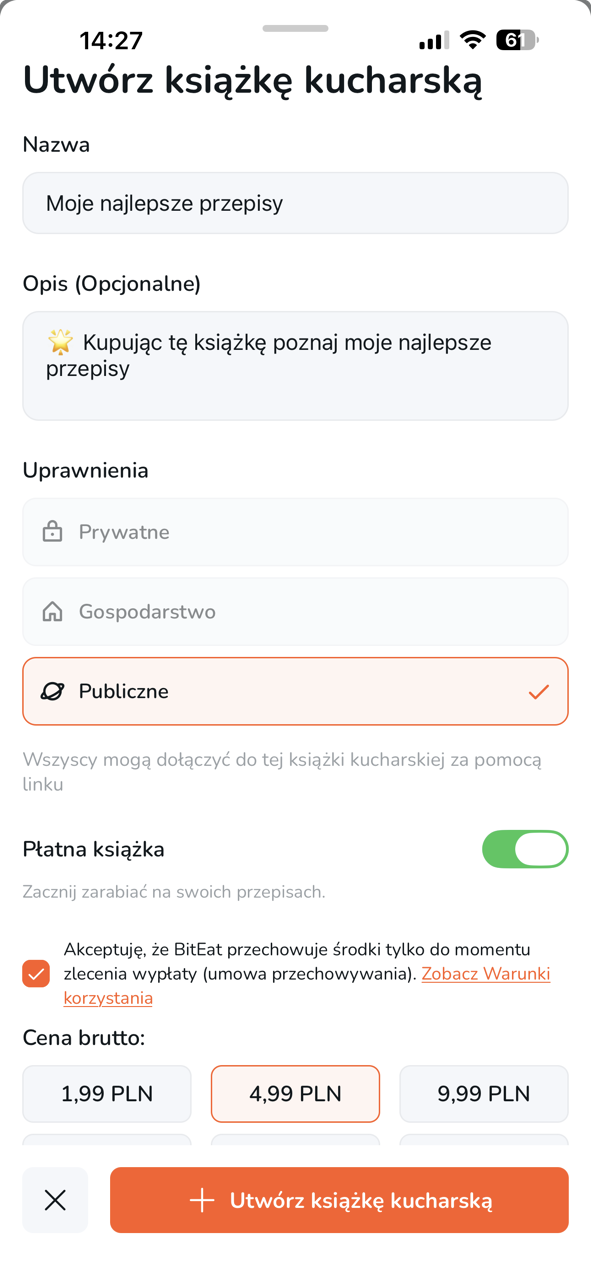
Package your best recipes as a paid digital cookbook. Fans buy in the app, you track sales, and you can request payouts when you are ready.

Why sell with BitEat
Built for people who already plan meals and collect recipes—not for clunky PDF storefronts.
You keep the audience in-app
Buyers unlock your cookbook in BitEat so they can cook, search, and plan with your recipes like any other collection.
Simple paid setup
Enable paid access on a public cookbook, set your price, and share one link—no separate website required.
Mobile checkout
Purchases run through the App Store or Google Play using familiar in-app purchase flows your buyers already trust.
Built for discovery
Your cookbook lives next to meal planning and shopping lists, so motivated cooks find you when they are ready to buy.
Payout workflow in the app
Request withdrawals to your bank account from Payments settings when your balance is ready—subject to thresholds and review.
Iterate on your catalog
Add recipes, refine descriptions, and grow your offering over time while the same link keeps working for new fans.
How selling works
From recipes to first sale in a few focused steps.
Build your cookbook
Create a public cookbook in BitEat and add the recipes you want to sell as a curated collection.
Enable paid access
Turn on paid access, choose pricing that fits your catalog, and complete any in-app checks shown to creators.
Share your link
Share your cookbook link on social media, your newsletter, or your website so buyers can open it and purchase in the app.
Get paid
After purchases, follow in-app guidance to verify payout details and request withdrawals when eligible.
Frequently asked questions
Who can sell a cookbook on BitEat?
Creators who use BitEat can publish a public cookbook and enable paid access where the feature is available. Availability may vary by platform and region.
Do buyers need the BitEat app?
Yes. Cookbooks are delivered as digital access inside the BitEat app so buyers can cook with your recipes using planning and list features.
How do payouts work?
Earnings accrue in your creator balance. You request a payout from the app to a bank account you provide, subject to minimums, verification, and processing times.
Can I change the price later?
Pricing is managed in the app. You can adjust your offering as your catalog grows—always follow any notices shown in the creator flow.
What about taxes and legal obligations?
You are responsible for your own tax reporting and for complying with local laws. BitEat provides the marketplace flow; consult a professional for advice.
Is this feature available everywhere?
In-app purchases and creator payouts depend on store policies and regional availability. If an option is not shown, it may not be available on your device yet.